
When a monitor sits too low on the desk, a riser is the cheapest way to lift it, and it buys back the space beneath the screen for your keyboard at the same time. Plenty of guides treat the riser as a commodity and grade a row of near-identical shelves by review count, which skips the question that really settles the choice. The more useful way to see it is as three separate products, divided by material and by what that material lets the shelf do: a warm wooden shelf, a height-adjustable metal frame with a drawer, or a plain sheet of glass. Each one answers to a different desk and a different owner. Settle on the material that matches your setup and your screen's weight, and only one sensible model is left in each camp.
First decide the material, then the model
Settle the material question first, because wood, metal and glass each lead somewhere quite different.
A wooden riser is the warm, dependable default. It is usually a fixed-height shelf, often with a second tier for a little extra room, and it looks at home on a desk made of wood or anything close to it. You do not adjust it; you set the screen on top and leave it. For most people at most desks, this is the one to picture first.
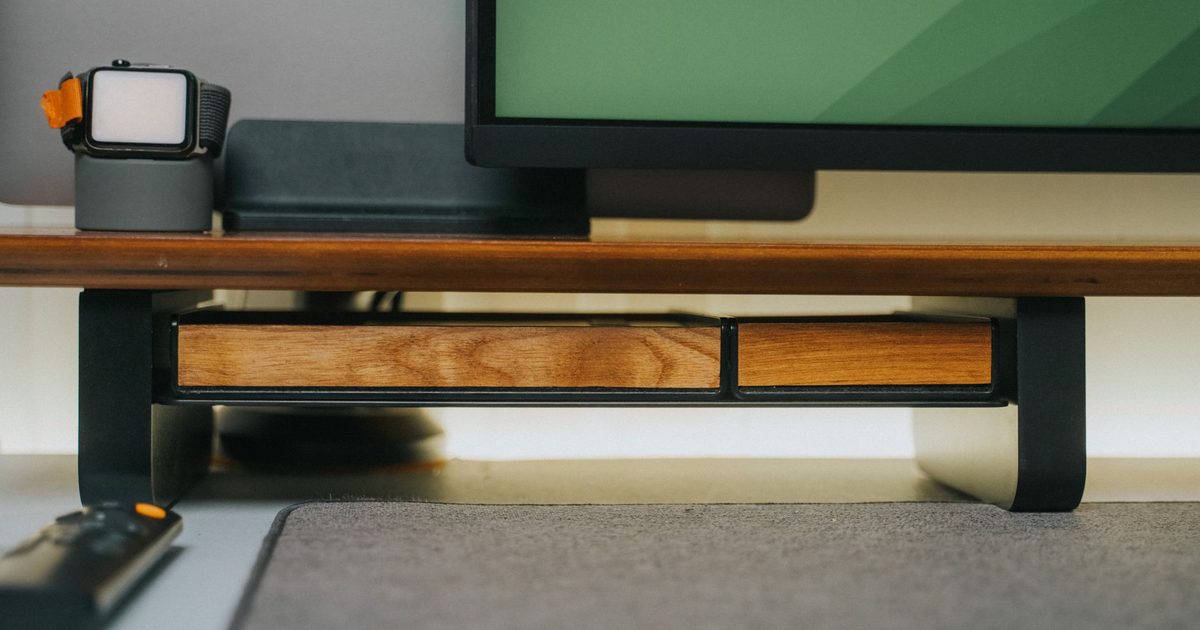
A metal riser trades the warm look for mechanism. The useful ones adjust for height, so you set how far the screen rises rather than living with one fixed step, and many add a pull-out drawer that turns the dead space under the monitor into somewhere for pens, a notebook or the bits that gather there. It is the pick for a desk that keeps changing, or for anyone who likes to set the rise exactly.
A glass riser is the minimalist's choice: a single clear sheet that recedes into a tidy desk and wipes clean in moments. It carries less and does less, with no storage and a surface that shows every fingerprint, but on a glass-topped or pared-back setup nothing else sits as quietly in the scene.
So look honestly at your own desk. If you mainly want the screen up and the keyboard tucked under, and a bit of warmth in the room suits you, the wooden shelf is the easy call. If the setup is forever being rearranged, or a hidden drawer would earn its keep, lean metal. And if the desk is glass or you keep it deliberately spare, the glass deck respects that better than anything with shelves and legs.
The pick for each material
1. BONTEC 2-Tier Wooden Monitor Riser - Best Wooden Monitor Riser
HSP Score: 8.8 / 10 - The one most desks want: two wooden tiers and a 30 kg load rating, with nothing to set up.
Capability 8.9/10 - Versatility 8.5/10 - Build 8.0/10 - Value 8.5/10 - Fit 9.4/10
Fit for this guide: The sensible default for most desks: a two-tier wooden shelf that lifts the monitor and tidies the keyboard away underneath.
Every pick here is scored out of 10: four marks rate the product and are the same in every guide, and the fifth rates its fit for this guide - how we test and score.
For the majority of desks this is the obvious starting point, because it does the core job without asking anything of you. Two wooden tiers hold the monitor up top while the gap beneath swallows the keyboard when you slide it away, or a small heap of things you would rather keep out of sight. The shelf is rated to a 30 kg load, far beyond what any single desktop monitor weighs, so a big screen on top never feels like a gamble. The honest limits are the price of that simplicity: the height is fixed, so what the shelf gives is what you get, and the two-tier build stands taller on the desk than a thin single shelf. Neither is likely to bother you if a warm, set-and-forget shelf is what you came for.
Pros
- ✓ Rated to a 30 kg load, so a large monitor sits steady with room to spare
- ✓ Two tiers give the clutter a home, not just the screen a lift
Cons
- ✗ Fixed height, so you cannot set how far the screen rises
- ✗ The two-tier build is bulkier than a slim single shelf on a shallow desk
Who it's for: Most home desks, and anyone who wants a warm-looking shelf that lifts the monitor and tucks the keyboard away with nothing to assemble or adjust.
Who it's not for: Someone who needs to set an exact height, or a very shallow desk where a taller two-tier shelf would crowd the space.
2. LORYERGO Height-Adjustable Metal Monitor Riser - Best Adjustable Metal Riser
HSP Score: 8.7 / 10 - The flexible one: a height you set yourself, plus a drawer tucked underneath.
Capability 8.9/10 - Versatility 8.9/10 - Build 8.0/10 - Value 8.5/10 - Fit 8.9/10
Fit for this guide: For a desk that keeps changing: the adjustable metal riser lets you fine-tune the height and reclaim a drawer's worth of desk.
If the wooden shelf's single fixed height is the sticking point, this is the fix. The LORYERGO is a metal riser you can set to a range of heights, so rather than accepting one step up you choose how far the screen climbs to suit your chair and desk. It also does something no plain shelf manages: a pull-out drawer underneath, which turns the dead space beneath the monitor into a home for pens, sticky notes or a phone kept out of view. A phone holder sits alongside, and the metal frame keeps the footprint tight. The trade-offs are a smaller platform than the broad wooden shelf, so a very wide monitor foot can overhang, and a bare metal look that reads more modern than traditional. For a desk in constant flux, or anyone who wants a drawer's worth of order back, the adjustment is worth more than the wood's warmth.
Pros
- ✓ Adjusts for height, so you set exactly how far the screen rises rather than taking one fixed step
- ✓ A pull-out drawer reclaims the space under the monitor for small desk clutter
Cons
- ✗ A smaller platform than the wide wooden shelf, so a broad monitor foot can overhang
- ✗ The bare metal look suits a modern desk more than a traditional one
Who it's for: A desk that changes often, or anyone who wants to set the height and claw back a drawer of storage from under the screen.
Who it's not for: Someone with a very wide monitor base that needs a broad platform, or anyone set on a warmer wooden finish.
3. FITUEYES Glass Monitor Riser - Best Glass Monitor Riser
HSP Score: 8.2 / 10 - The near-invisible lift: a clear 38.5 cm deck for a pared-back desk.
Capability 8.0/10 - Versatility 8.0/10 - Build 8.0/10 - Value 8.5/10 - Fit 8.5/10
Fit for this guide: For a minimalist or glass-topped desk: the glass riser hides in a clean setup and wipes down in seconds, fingerprints aside.
This is the one for a desk you keep deliberately bare. The FITUEYES is a single sheet of glass, a 38.5 cm deck wide enough for a monitor's stand to sit on, and on a glass-topped or pared-back setup it reads as next to nothing: no shelf bulk, no visible frame, just the screen lifted a touch higher. It wipes clean with a cloth where a textured wooden top would not, which is part of its charm on a tidy desk. Be clear about the cost of the look, though. There is no storage at all, so it lifts the screen and leaves the clutter beneath exactly as it was, and glass shows every fingerprint and fleck of dust, so a deck that looks immaculate today wants the odd wipe to stay that way. If a clean, barely-there lift is the whole point, that is a fair trade.
Pros
- ✓ A clear glass deck recedes into a minimalist or glass-topped desk
- ✓ Wipes clean in moments, with no textured surface to trap dust
Cons
- ✗ No storage at all, so it lifts the screen and does nothing for clutter
- ✗ Glass shows every fingerprint and wants the odd wipe to stay clear
Who it's for: A minimalist or glass-topped desk where the riser should be seen as little as possible and wipe clean easily.
Who it's not for: Anyone who wants storage under the screen, or who would rather not be wiping fingerprints off a surface.
Quick verdict
Let your desk and your screen settle this, not the length of a spec sheet. After a warm shelf that lifts the monitor and tidies the keyboard away with nothing to assemble? The BONTEC 2-Tier Wooden Monitor Riser is the one most people should look at first. Want to set the height yourself and gain a drawer? The LORYERGO Height-Adjustable Metal Monitor Riser suits a desk that keeps changing. Keeping the desk deliberately bare? The FITUEYES Glass Monitor Riser lifts the screen and barely shows. Still torn between a passive riser and a clamp-on arm? Our monitor riser versus monitor arm guide weighs the two, and the best monitor arm guide covers the arm route if you go that way.
Riser, arm or laptop stand: which is which
These three names get muddled, and buying the wrong one is the usual slip. A riser is the passive desk shelf this guide is about. An arm is the clamp-on, jointed mount that lets a screen float and move, which our riser versus arm comparison weighs in full, VESA and desk-edge checks included. A laptop stand is the odd one out: it props a laptop's own screen to a typing angle rather than lifting a separate monitor, and the best laptop stand guide is the page for that. If your setup is basically right and the screen simply sits too low, the riser is the plain, cheap answer.
Load and stability: match the riser to the screen
The fact the commodity lists skip over is weight. A riser has to hold a screen steady at a raised height, and a shelf that bows under a heavy monitor is worse than no riser at all. The number to read on the listing is the stated load rating, and the sensible move is to leave real headroom over your screen's weight rather than buying right to the limit. The wooden pick here is rated to 30 kg, far more than any single desktop monitor weighs, so it stays steady under a big panel. The metal and glass picks are sized for a normal single monitor; the honest rule is to check a riser's rated load against your screen's weight, which the monitor's own spec sheet lists, before you buy. Footprint matters next to weight: a riser narrower than your monitor's base leaves the stand hanging off the edge, so measure the foot of your screen against the platform, not only the kilograms.
Storage: a drawer, a shelf, or nothing
What a riser does with the space underneath genuinely separates the three, and it is worth weighing before you choose. The wooden pick stacks two tiers, so it lifts the screen and gives the clutter somewhere to sit in one move. The metal pick goes further with a pull-out drawer, which hides pens and oddments out of sight rather than parking them on an open shelf. The glass pick does nothing here by design: it lifts the screen and leaves the desk beneath as tidy or as cluttered as you keep it. If clawing back desk space is half of why you want a riser, that steers you to the wooden shelf or the metal drawer; if you only want the lift and a clean surface, the glass is honest about doing that one thing.
Does a riser get the screen to a better height?
It is worth being careful here, since risers are easy to oversell. A riser lifts a monitor by a fixed amount set by its design, a few inches in practice, which nudges the screen up towards the sort of height many people choose for a monitor, where the top of the screen sits roughly level with the eyeline of someone sitting upright. Whether that lands right for you turns on your chair, your desk height and how tall you are, which is exactly why the adjustable metal pick exists: it lets you set the rise rather than accept one fixed step. We will not oversell what a riser does, because where a screen should sit comes down to your own setup and comfort, not to anything the shelf itself can promise. What a riser gives you is the height, plainly and cheaply; our monitor height explainer covers how people commonly position a screen if you want a mark to aim at.
How we chose
Material is what separates one riser from the next, so we sorted by that first and chose a single clear pick for wood, for metal and for glass, rather than grading a row of near-twins by review count. The three that resulted are genuinely different objects: a fixed two-tier wooden shelf, a height-adjustable metal frame with a drawer, and a plain glass deck. Every number on this page is lifted from the product's own listing: the wooden shelf's 30 kg load rating, its two tiers, the metal pick's adjustable height and drawer, the glass deck's 38.5 cm width. Where a listing stayed silent on a figure, we left it out rather than guessing. We have not lived with any of these for a year, so they count as spec-checked rather than hands-on, and every verdict turns on the design and build in front of us. The shortlist is limited to risers you can actually order through Amazon UK, which ruled out a few nice pieces sold only direct from their makers. Prices and star ratings appear nowhere here on purpose, since both drift week by week and a number that looks right today may mislead you by the time you are reading this.
FAQ
Q: What is the difference between a monitor riser and a monitor arm? A: In short, a riser is a fixed passive shelf for a screen that only needs lifting, while an arm bolts onto the desk, lets the screen move and clears the space beneath it, for more money and with a VESA fitting to match. Our riser versus arm guide weighs the two in full, including the VESA and desk-edge checks, so we will not repeat all of it here.
Q: How much weight can a monitor riser hold? A: It varies by model, so read the stated load rating on the listing and keep headroom over your screen's weight rather than buying to the limit. The wooden pick here is rated to 30 kg, well beyond any single desktop monitor; the metal and glass picks are sized for a normal single screen. Check a riser's rated load against your monitor's weight, which its own spec sheet lists.
Q: Can I put a laptop on a monitor riser? A: You can rest a laptop on one, but a riser is built to raise an external monitor to a viewing height, not to hold a laptop at a comfortable typing angle. If it is a laptop screen you want lifted, a laptop stand is the right tool, and our best laptop stand guide covers those. A riser earns its place when a laptop drives a separate monitor that needs to come up.
Q: Wood, metal or glass - which should I choose? A: Wood is the warm default: a fixed shelf with a second tier, right for most desks. Metal is the adjustable one with a drawer, for a desk that changes or anyone who wants to set the height. Glass is the minimalist pick that barely shows on a tidy or glass-topped desk but offers no storage and shows fingerprints. Match the material to your desk's look and whether storage or adjustment matters more.
Q: Will a monitor riser help if my screen is too low? A: That is exactly its job. A riser lifts the monitor by a set few inches so the screen sits higher than it did flat on the desk. How high you want it is a personal call that depends on your chair and desk, which is why the adjustable metal pick helps if one fixed height might not suit. See our monitor height explainer for how people commonly position a screen.
Affiliate disclosure: This page contains affiliate links. As an Amazon Associate we earn from qualifying purchases, at no extra cost to you. See our disclosure page for details.